Blog
AI LinkedIn headshots that don't look AI: six checks
How to judge an AI LinkedIn headshot before you pay, and how to check the pictures you get. Six things to look at, in the order that catches the most.
5 September 2026
The category has a reputation, and it is mostly earned. Enough people have paid for headshots and got back a waxy stranger that "does it look AI?" is now the first question rather than the last.
It matters most on LinkedIn, where a recruiter or a client decides in about a second whether the person in the photo is real.
It is answerable before you pay. Here is what to look at, in the order that catches the most.
A disclosure first, because it changes how you should read the rest: we build one of these. The checks below are the ones we use on our own output, and two of them are things we got wrong ourselves before we measured. Take the list, use it on us as well.
1. Ask to see a set, not a picture
Any tool can produce one good frame. The question is whether it can produce twelve of one person, and a marketing page showing twelve different faces is answering a different question.
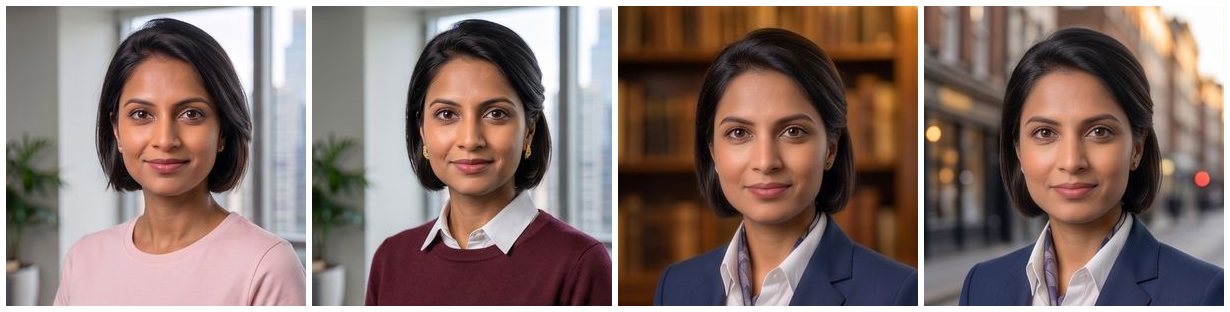
Look for the wardrobe and the room actually changing across the set. If every picture is the same jacket against a different wall, you have been sold one photograph twelve times.
2. Zoom into the skin
This is the fastest tell there is, and it takes two seconds. Open a sample at full size and look at a forehead.
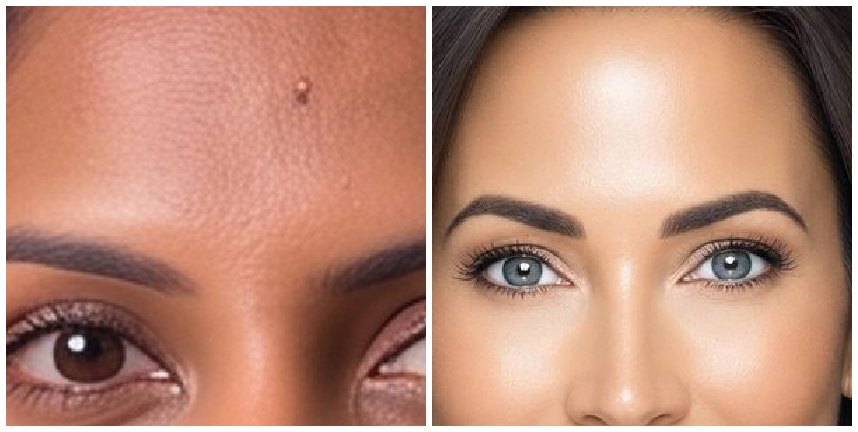
Real skin has pores, lines and uneven tone. What image models produce, left alone, is a surface: poreless, evenly lit, with a glossy highlight on the forehead and nose. Once you have seen it you cannot stop seeing it.
Check the eyes and teeth in the same glance. Over-sharpened, glassy eyes and a row of identically white teeth come from the same pass.
3. Is it the same person in every one?
Look across the set at one feature at a time: the nose, the jaw, the hairline, a mole. Any single picture can pass. Together they often do not — the face drifts, and the drift is what people notice without being able to name it.
This is the fault worth caring about most, and why it happens is worth understanding before you buy: some of it is too little to work from, and some of it is a step that repaints the face after it has been made.
4. Ask whether the picture you pick is the picture you get
Almost nobody asks this, and it is where a set quietly goes wrong. You are shown previews, you choose your favourites, and then something has to produce the final file.
If it re-runs the prompt at a higher resolution, you get a different photograph — the same clothes and the same room, a subtly different person. Nothing about it is broken and nothing errors; you simply receive a near-miss of the one you chose.
The answer you want is that the final is the preview, delivered at full size and unwatermarked. Ours is a copy of the file that made the preview, which is why it is identical by construction, and free.
5. Check the pixels, not the invoice
If you pay for an upgrade, open the file you receive and look at its dimensions. That is the whole check.
We learned this one the hard way: we sold a 4K upgrade, the provider charged us real money for every one, and the file that came back was the same size as the file that went in. The charge was real; the upscale was not. A cost is evidence that money moved, and never evidence of what came back.
Nobody will mind you asking what resolution you receive. If the answer is vague, that is the answer.
6. Show it to somebody who knows you
The last test is the only one that decides anything, and no amount of looking at pixels replaces it. Send three to a friend or a colleague and ask which one looks like you.
They will tell you in about a second. People are extraordinarily good at their own species' faces, which is exactly why a picture that is nearly you is worse than an ordinary photograph that is.
And one that is not about the pictures
Ask what happens to your photographs afterwards — who can see them, what they are used for, and when they are deleted. Ours are deleted after 30 days, and nothing of ours is trained on them. It is a fair question to ask anyone you hand twenty pictures of your own face to, and the answer should be easy to find rather than buried.
$25.00 for eight HD headshots, $35.00 for sixteen HD headshots, or $49.00 for twenty-four HD headshots, and every picture is chosen from a spread rather than handed to you. What each pack includes.
Read next
 Basics
What is a headshot, and what is a DP?
A headshot is a kind of photograph. A DP is where you put it. What each word means, where each is used, and why one picture has to do both jobs.
Read article → Style
StyleWhat to wear for a LinkedIn headshot
Your LinkedIn headshot is seen a hundred pixels across. Plain beats patterned, collars add structure, and traditional dress is business dress.
Read article → How-to
Which photos to upload for your LinkedIn headshot
How many photos to upload for an AI LinkedIn headshot, how varied they should be, and the ones that quietly ruin a set.
Read article →